





About
Neural networks can feel like a black box. The goal of this project is to let users discover not only what neural networks do, but how they do it. This is a series of interactive and visual webpages to teach users about how neural networks transform inputs to outputs, and how they train. Users can connect to LEGO® CI + AI hardware to see how their network performs in real time.
Network Builder and Trainer
Network Builder
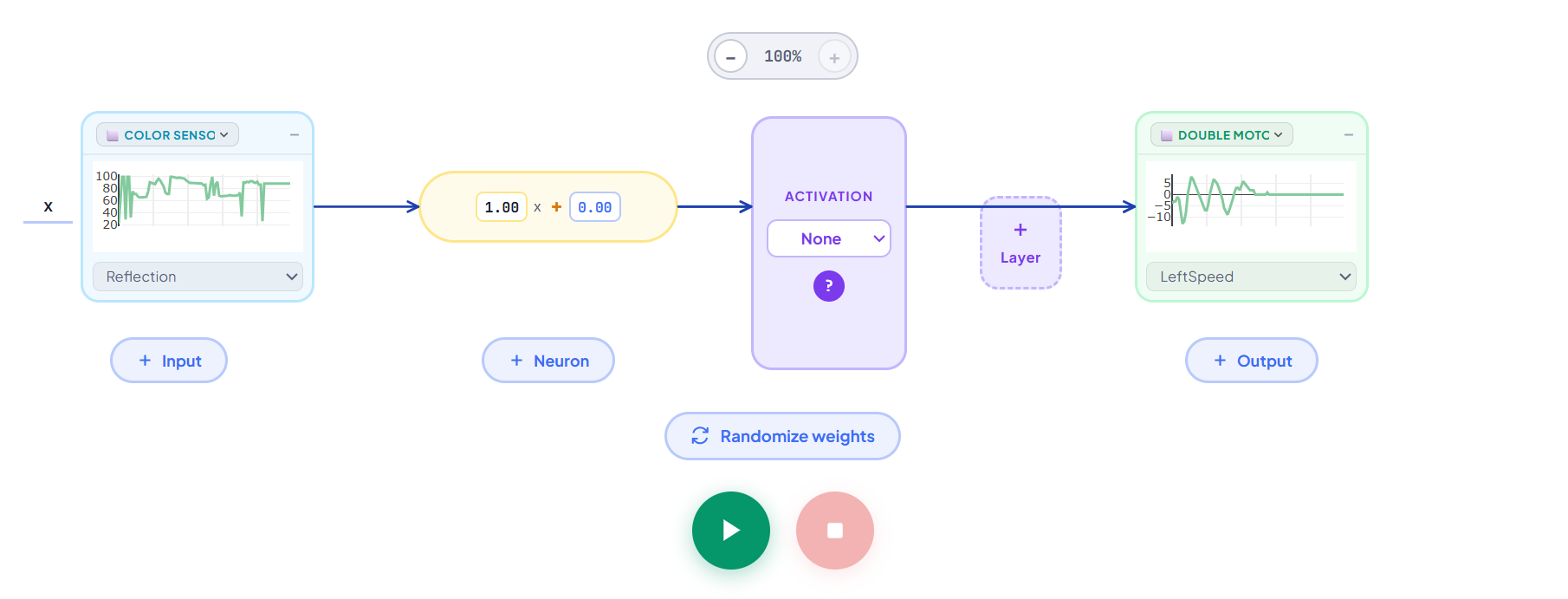
This is a webpage that teaches users how a neural network is structured. Users can connect LEGO CS + AI hardware, and manually build a small neural network that takes input and sends output to their LEGO hardware.
See daily logs and more info for this webpage here.
Network Trainer
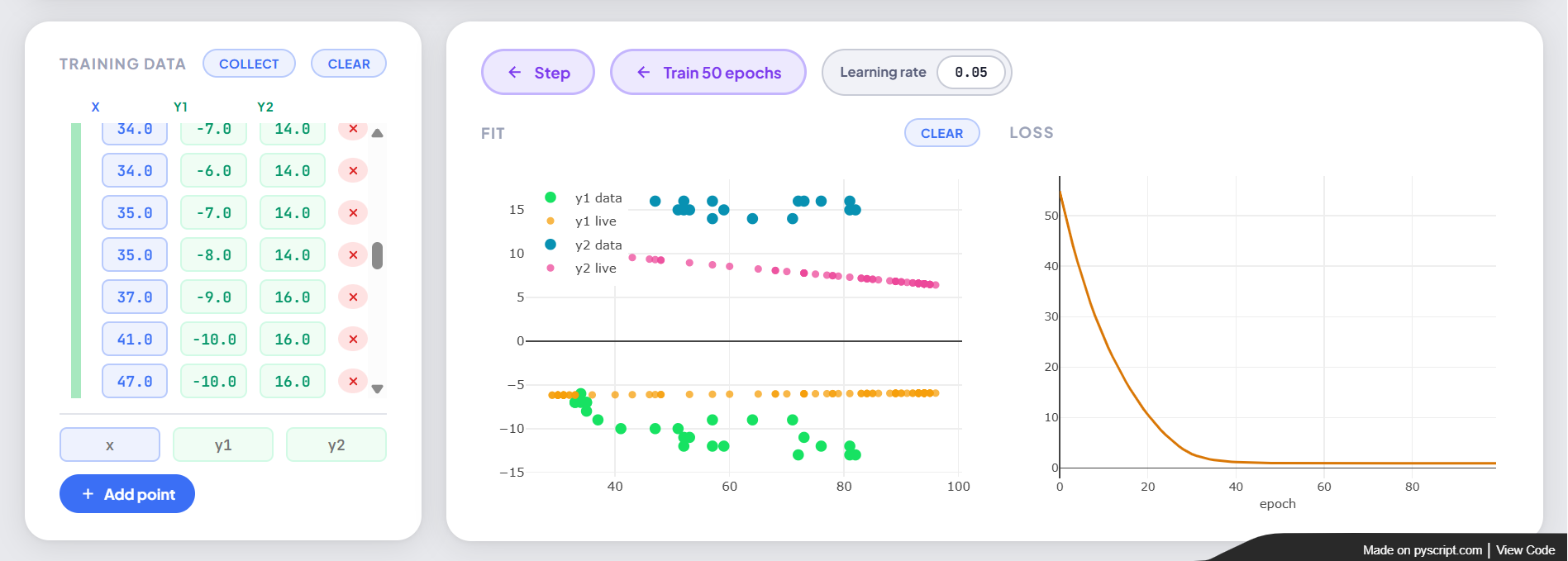
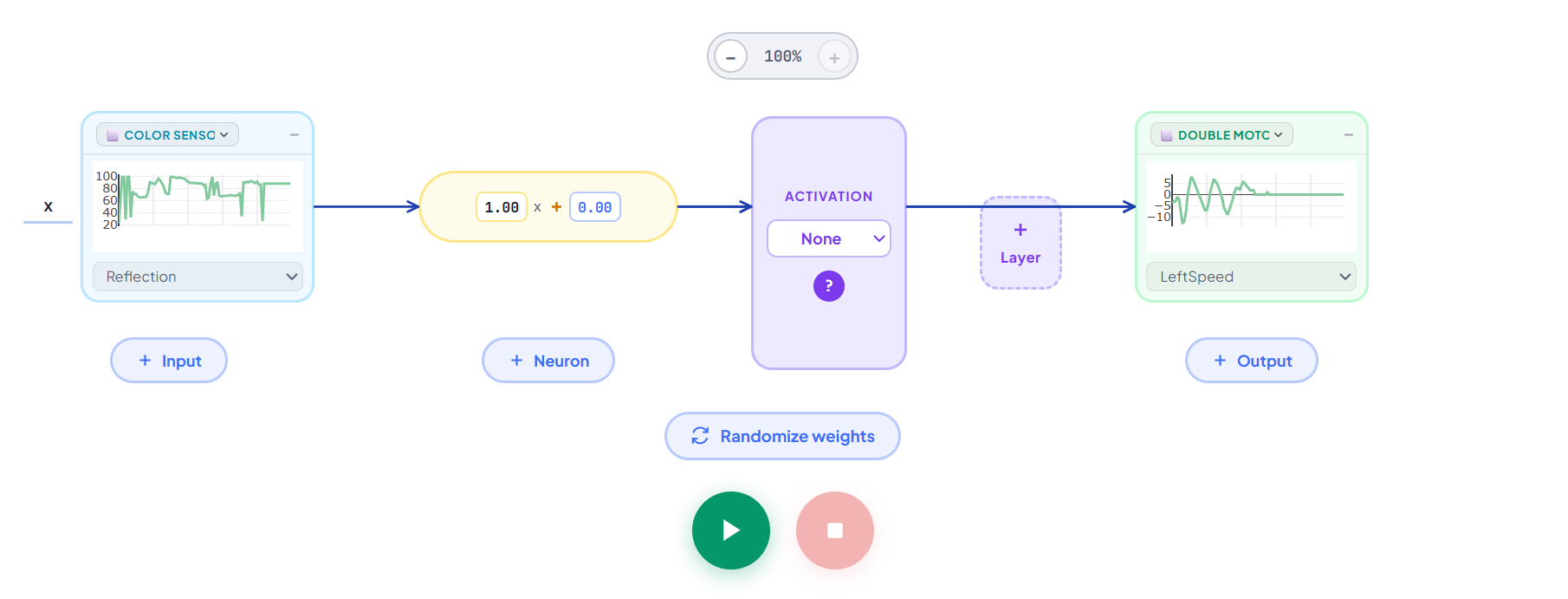
This is the next page in the sequence after network builder. Users have all the same functionality as in network builder, but can now input a dataset and train their model one epoch at a time or 30 epochs at a time. Users can also stream data from their hardware as a method of collecting data. Users can run their model on the hardware, and view how closely their model fits their data.
See daily logs and more info for this webpage here.
What These Teach
Broadly, this page teaches students how neural networks are structured, what math goes into them, and how that structure impacts how it trains.
Learning Progression
Network Structure Activities
- Understanding basic input to output flow: Make a double motor car drive at the speed inputted by the controller
- Changing the weights and biases: Using the controller, make the car drive at 0 when the controller percent is 0, 50 when the controller is at 0, and 100 when the controller is at 100.
- Using multiple inputs and outputs: Make the each wheel in the double motor controlled by each stick in the controller
- More outputs than inputs: Make the car drive faster and the light grow brighter based on the color sensor reflection input.
- More inputs than outputs: Make the car drive faster when the single motor angle and/or color sensor reflection are higher
- Introducing activation functions: Using one controller stick to control the speed of the car, set the speed to 0 if the controller percent is below 0, but positive speed for all other values
- Hidden Layers: Control the car speed with one controller stick, but the car should drive at the absolute value of the controller value. This function is nonlinear and cannot be fit with just an activation function, it needs another layer.
Training Activities
- Intro to building a model from data: Make a double motor car drive at the speed inputted by the controller, but use data instead of hardcoded equations and train your model to fit the data
- Understanding streaming data, and messy data sets: Repeat the above task, but use the collect data function to get your data instead of manually inputting it. One partner hand drives the car, one moves the controller. Clean up the data as needed.
- A simple ML Application: Train the robot to follow the edge of a line with three points (off the line, on the line, on the edge of the line). Each wheel speed should have a linear relationship with the color sensor reflection. Afterwards, users can also try this by streaming the data instead of manually inputting it.
- Structuring a network for more complex data: The train the robot to sprint on the line, and turn slowly when it leaves the line until it finds the line again. Start with the three datapoints again, then try with streaming the data. This function is no longer linear with the wheel speeds, users now have to consider how the shape of their network can allow for non linear functions. They can try using multiple layers, different number of neurons, and activation functions. Have users first try without activation functions, then find that that structure can only ever fit linear data, no matter how big and complicated their network is.
Additional Activities Created by Vigga Thomsen
How is this relevant to classrooms?
CSTA Standard Alignments
- CSTA E2-ALG-ML-02: Examine how data is used to train a machine learning model
- CSTA E3-ALG-ML-02: Investigate how a machine learning model can change when new data is
added to a training set. - CSTA E4-ALG-ML-02: Analyze relationships between the properties of training data and a
machine learning model’s output. - CSTA E5-ALG-ML-02: Train a machine learning model to make a classification or prediction
- CSTA MS-ALG-ML-06: Hypothesize how a machine learning model generates classifications
or predictions. - MS-ALG-ML-07: Investigate ways to improve the accuracy of a machine learning model
and reduce bias by refining the quality of examples and nonexamples in the training data. - CSTA HS-ALG-ML-08: Develop a machine learning model for a chosen task using appropriate
data and tools. - CSTA S1-AIN-DD-01: Analyze AI systems to differentiate the types of problems they address.
- CSTA S1-AIN-DD-02: Modify AI system training data to improve fairness and accuracy in outputs
- CSTA S1-AIN-DS-06: Examine how data flows through a neural network structure.
- CSTA S1-AIN-DS-07: Apply data acquisition, cleaning, and transformation techniques to prepare data for AI analysis.
Next Steps
- Detailed training math: This webpage teaches the structure of networks and allows you to train a network, but it does not touch on the exact training mechanisms. To address that, I created this gradient descent webpage, and this backpropagation webpage that explain the math of the webpage. However, they lack a hands on component, and it would be interesting to combine the visuals from this webpages into this webpage for users who are ready to dig deeper.
- Data normalization and training: This webpage normalizes the data (scales the values down so that the training process works better) on the backend when training. This data normalization is common in neural networks, and users looking to dig more into the training side of networks and may want to train their own larger network would benefit from understanding that process and why it is required. A separate version of this webpage could cover normalization and flaws that can happen in the training process, and in particular, vanishing and exploding gradients, and what saturation of an activation function is.
- Other types of networks: This webpage covers just one type of neural network (fully connected network). There are tons of other structures of networks that all have various applications, and building other webpages to visualize those types of networks and their applications could be useful for interested users.
Gradient Descent Visualization
About
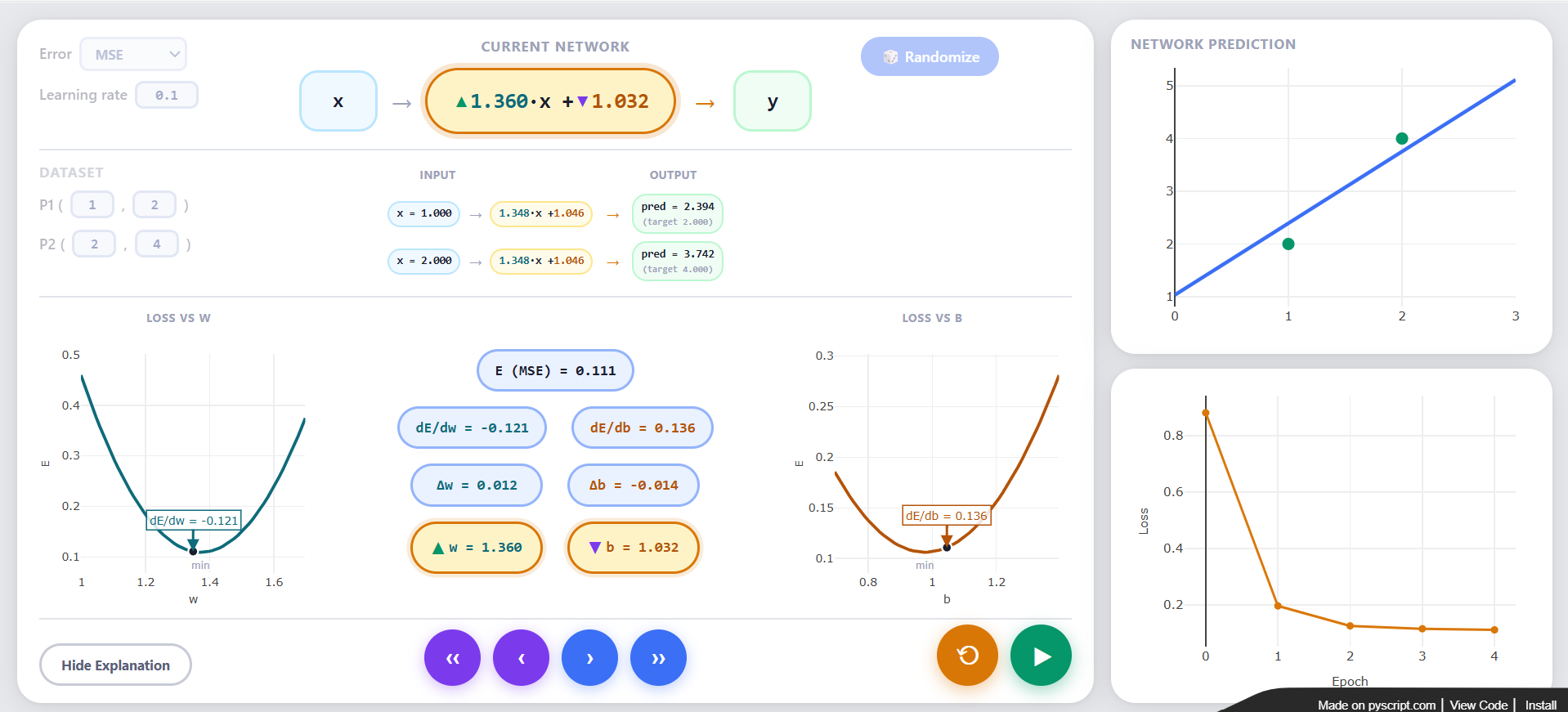
Gradient descent is the mathematical mechanism that neural networks use to adjust the weights and biases of each neuron in their network. This is a webpage that gives users a visual and mathematical explanation of gradient descent. Users can choose two points and train a network consisting of a single linear neuron, going through the math one step at a time to understand how the neuron updates to fit the data. The page features plots to provide a visual translation of the math.
See daily logs for this project here.
What this Teaches:
This teaches users the exact math behind gradient descent for one neuron. Some questions for users to consider as they explore:
- What is this trying to achieve? We could let it run forever, but where does it make sense to stop it?
- What are the steps that the descent goes through each round (epoch)?
- How is the derivative used to calculate the change in w and b? Why do you think that is?
- Where does the learning rate come into play? What happens when it is really small? What happens when it is really big? Why?
Next Steps
- Making it hands on: This webpage lacks any hands on component, and is purely visual. It would be interesting to combine it with the Network Trainer webpage to allow this to connect to the LEGO hardware to make users feel like there is still a purpose for doing this training.
Backpropagation Visualization
About
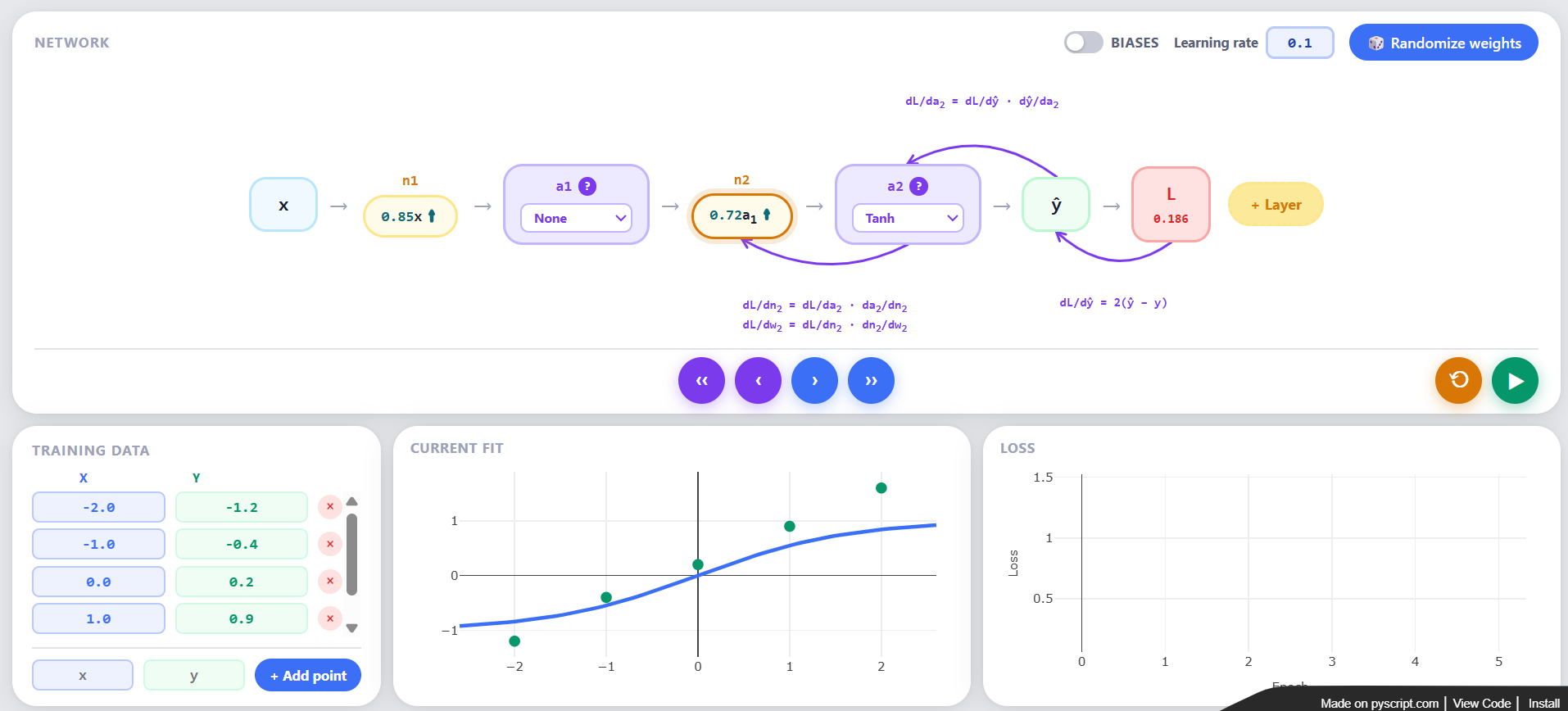
This webpage gives users a visualization of backpropagation and the chain rule across a neural network. It limits users to one neuron per layer to simplify the chain rule math and give users a clearer picture of what is going on. It is recommended that users first play with the Gradient Descent Visualization to understand the importance of derivatives in the training process.
What this Teaches:
This teaches users the math behind backpropagation for a many layered network. Some questions for users to consider as they explore:
- What is this trying to achieve? We could let it run forever, but where does it make sense to stop it?
- What derivatives are calculated and why? Hint: look at this gradient descent visualization to see how the derivatives are useful.
- Are the gradients larger, smaller, or unrelated as you go backwards through the network? Why?
- What does using multiple neurons allow you to achieve? How do the activation functions help there? Hint: try without any activation functions and see what happens.
- Why does it always start at the end of the network instead of the start?
Next Steps
- Making it hands on: This webpage lacks any hands on component, and is purely visual. It would be interesting to combine it with the Network Trainer webpage to make users feel like there is still a purpose for doing this training.
Networks on SPIKE Prime
About
The goal of this project was to push the limits of the SPIKE Prime hubs by putting neural networks on them. I explored varying levels of complexity in the neural networks I put on the hubs. In all cases, I trained the networks on my PC, then created a file containing the weights, biases, and functions to pass the data through those weights and biases to but on the hub.
See more detailed project log here.
Projects
- Four Direction Classifier: The first network I built just as a proof of concept. It is extremely simple, taking in the angle of a motor, and classifying it as either pointing up, down, left, or right. It has an input layer of size 2, a hidden layer of size 16, and an output layer of size 4, with ReLU functions in between. Code and network can be found in the GitHub link.
- Rock Paper Scissors Classifier: This network ramped up the complexity a bit. I built a “hand” with 3 motors, each motor representing a finger. 2 fingers down represented scissors, all fingers down represented paper, and all fingers up represented rock. The network took in the three motor positions as 6 inputs (sine and cosine for each), passed it through a hidden layer of 16 neurons, then to an output layer of 3 neurons, with ReLU functions in between. Code and network can be found in the GitHub link.
- Tennis Swing Classifier: This network pushed the hub’s capacity. It took 1.5 seconds of hub IMU data and classified the hub’s movement as a forehand, backhand, overhead, or none. It took in 30 time stamps, each with 6 IMU readings, for a total of 180 input points. This was attempted with various structures of networks, including a fully connected network, a CNN, and an RNN. The fully connected network was the fastest, but had slightly lower accuracy than the CNN. The CNN was slightly more accurate but slower to pass data through on the hub, and the RNN was just really slow and not that accurate. Code and network can be found in the GitHub link.
Building Line Followers
About
The goal of this project was to build a sequence of activities that would teach students about how neural networks train and backpropagate, and introduce them to other types of networks that train and are structured differently. Pascale Leone and I came up with this sequence of line follower activities, and started to test out some of the activities, although this was a small side project that we did not see out to completion. This activities were intended to be done by users coding the entire network, either without any packages or with PyTorch.
Activity Progression
- Intro to Network Structure: Program a follower where each wheel has a linear relationship to the reflection. This could be done without neural network, but this activity is intended purely for understanding the structure of a network without adding any problem complexity.
- Nonlinearity and Using a Hidden Layer: Program a line follower that sprints when it is centered on the edge of the line, and turns slowly when it is on the line or off the line. This problem is no longer linear, so you must use a neural network.
- Training From New Data: Program a line follower the same as the above one, but make it respond to new lighting environments. Have the network recalibrate its own dataset every so often to allow it to adapt to a shift in light. You can model the light shift by placing the follower on a darker background with a darker colored line. See the GitHub for what this code looks like, and this notion page for more information.
- Alternative Network Structure 1: Use a Long Short Term Memory (LSTM) Network. Program a dashed line follower using an LSTM so that the follower knows it is still on the track when it hits a dash. Note: when testing this activity, we found that the follower does best with small dashes and small turns. See this notion page and GitHub for more information, and this demo video.
- Alternative Network Structure 2: Use an encoding decoding network. Program a line follower that takes in all 8 values from the color sensor, and uses an encoder decoder network to encode those 8 values into 1 value. Then, use that one value to pass into your line following network. Note: We were not able to successfully get this one working, see this notion page for more information on our issues.
- Alternative Network Structure 3: Use a convolutional neural network. Program a line follower that uses a camera instead of a color sensor and passes the frames through a convolutional neural network to process the image, and determine how to set the double motor speeds. Note: this activity was not tested.


